For small resorts and inns in the Philippines

Your guests book on your website. You run it from one screen.

Rooms, add-ons, breakfast and events, on a website built for your place.

Launch offer: we build your website free for our first 10 clients. 10 of 10 left.

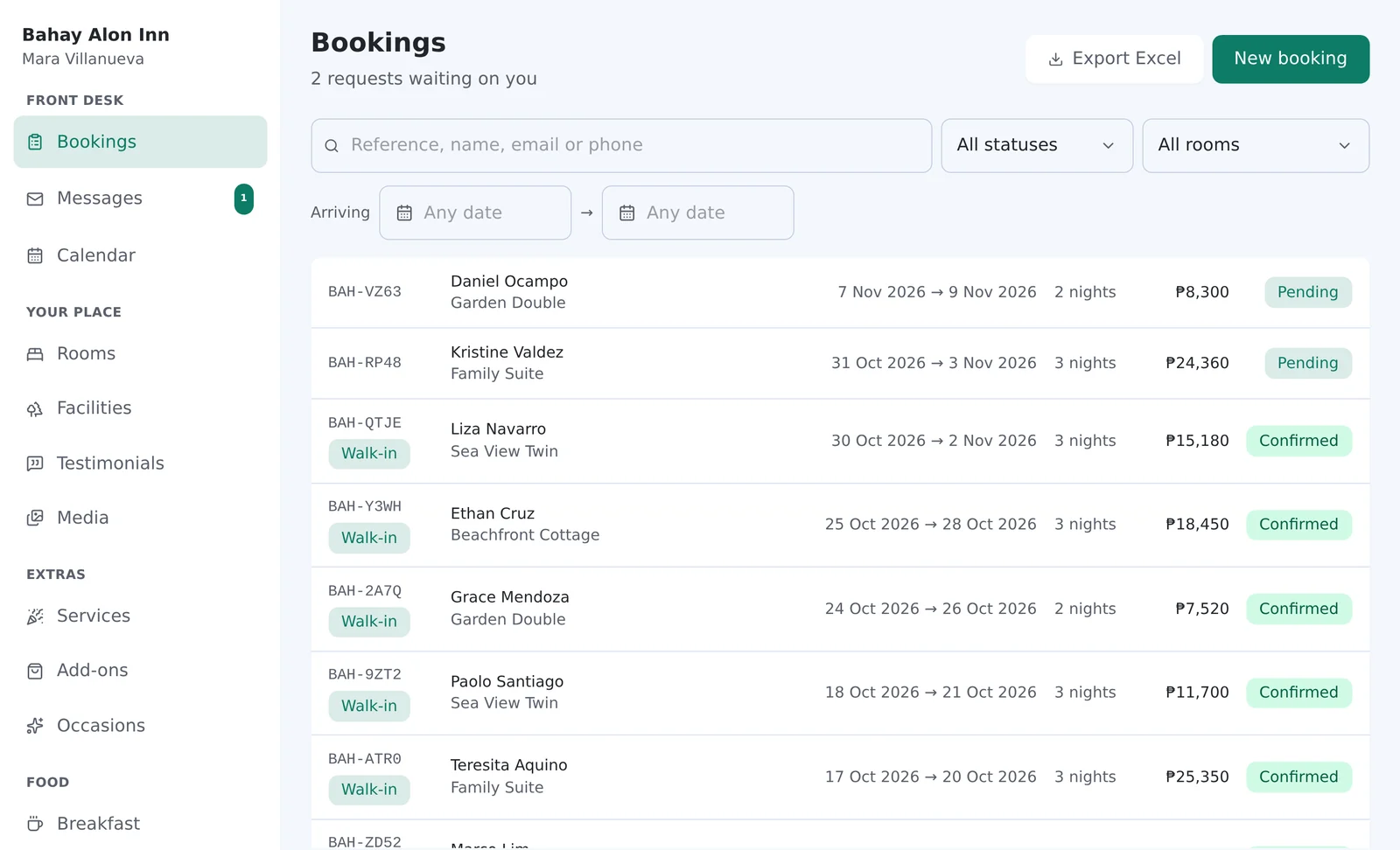
The Bookings screen: two pending requests from the website at the top, then confirmed walk-ins, each with dates, nights, total and status.
New request from your website

Daniel Ocampo

Garden Double, 7 to 9 Nov, 2 nights

₱8,300 Held for 72 hours

The real admin, on a demo property with invented guests.

The website looks lovely. It can’t take a booking.

For years we built websites for resorts and inns, and kept seeing the same thing. So we built the system behind the website.

How a booking works
  • The rooms are on Agoda

    Guests find your place, then book it somewhere that takes a cut.

  • The birthdays are in Messenger

    Events, transfers and extra breakfasts live in chat threads nobody else can see.

  • The menu is a two-year-old photo

    The site looks lovely, but nothing on it changes when your place does.

How a booking works

Requests, the way small places already take them.

  1. 1

    A guest asks

    They pick a room, dates and any add-ons on your website and send a request.

  2. 2

    The room is held

    Those dates stay off sale for 72 hours while you decide. Unanswered requests expire on their own.

  3. 3

    You confirm or decline

    From the admin, at the desk or on your phone.

  4. 4

    The guest hears from you

    TravelFrontDesk doesn’t take payments. The email tells the guest how to pay you, in your own words.

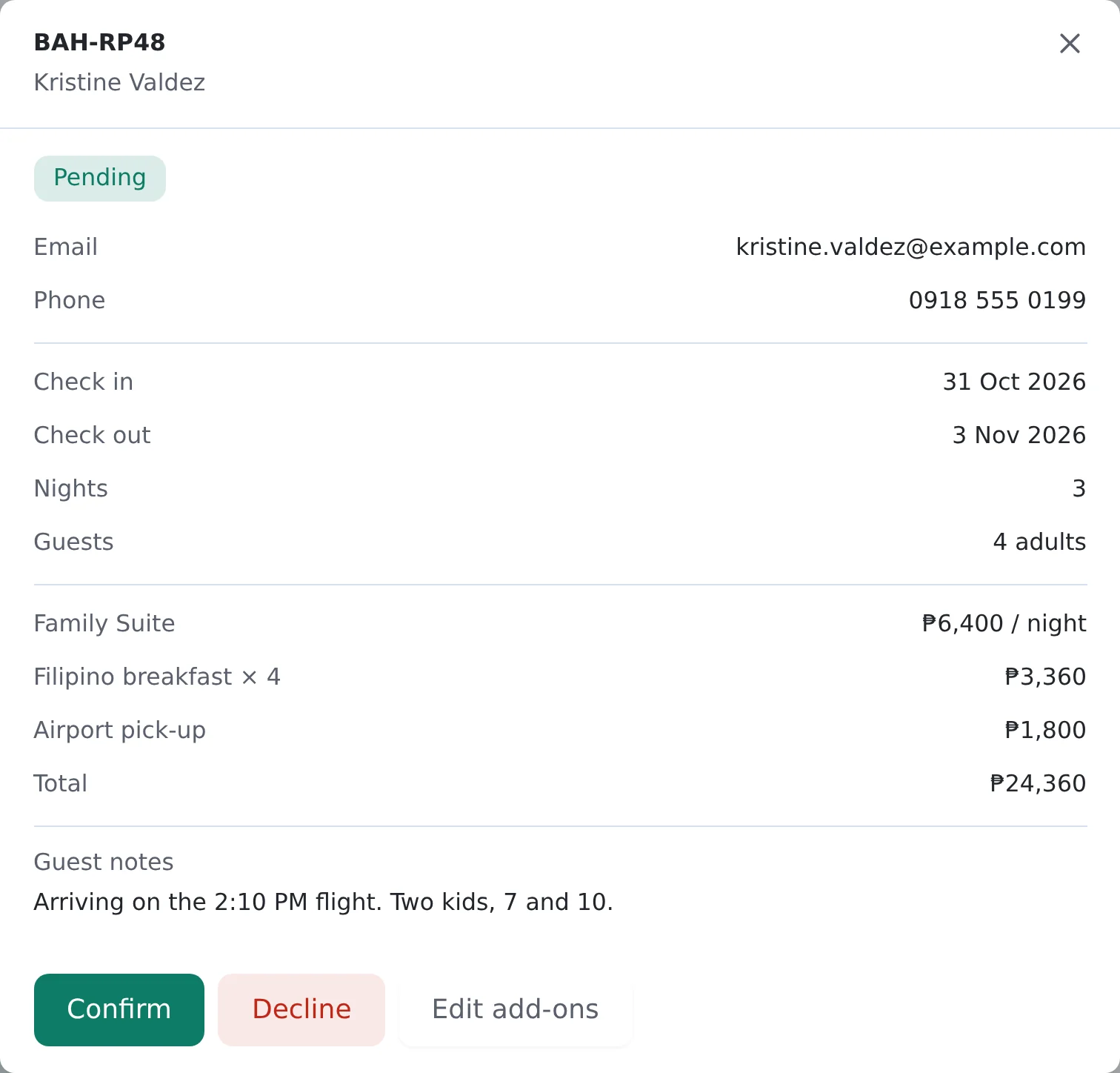
A pending request for the Family Suite, three nights, with Filipino breakfast for four and an airport pick-up added, the guest's flight note, and Confirm and Decline buttons.
A request with two add-ons. Confirm, decline, or change the add-ons before you confirm.

Sell the whole stay, not only the room.

Breakfast, transfers and birthdays are part of the stay. They belong on your website too.

Selling on Agoda too?

Close what you sold there, down to the unit. Block two of your three twins and the third stays on sale. For a room type with one room, calendar sync closes those dates by itself, a few times a day. For several identical units, you still block them by hand.

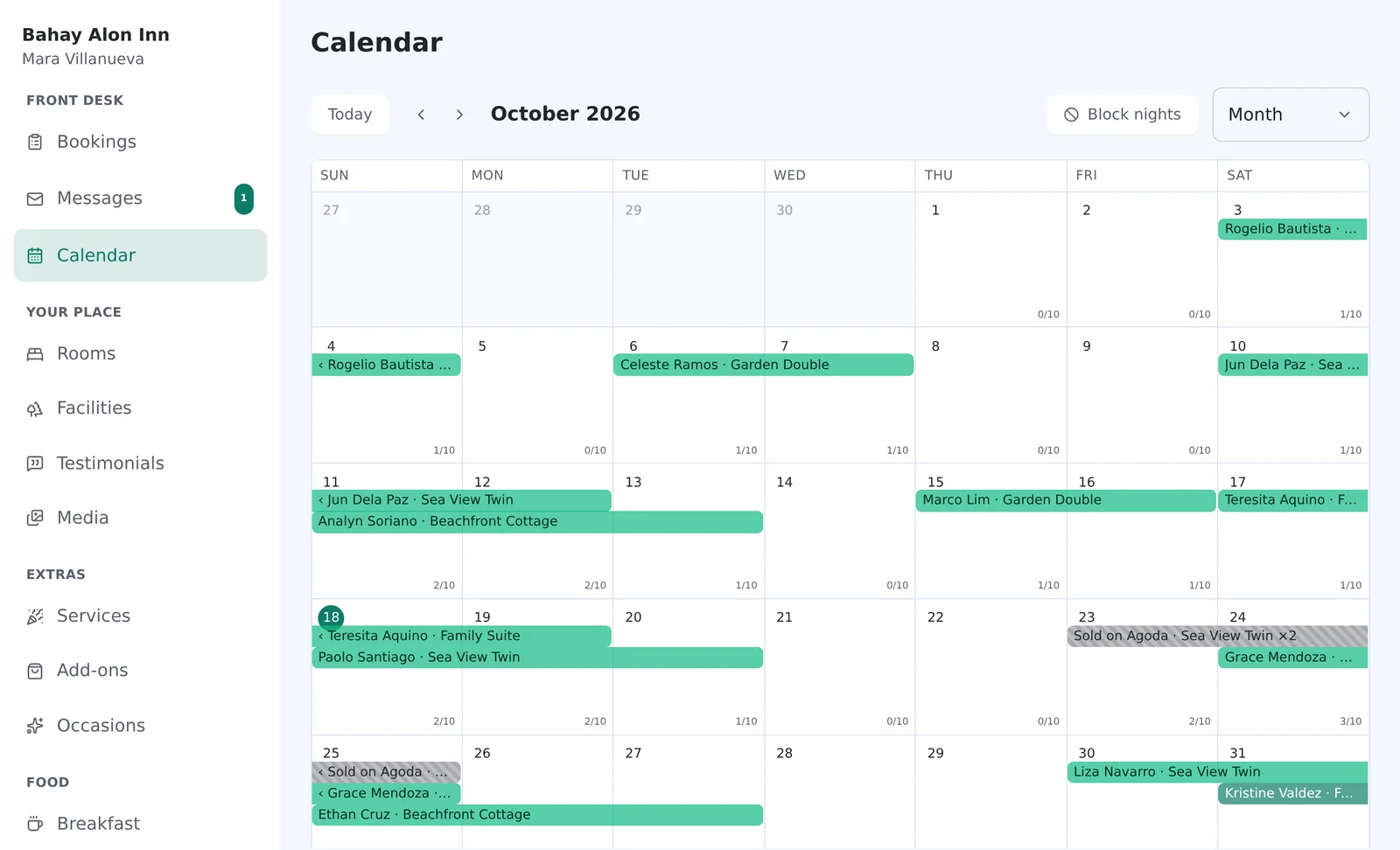
The month calendar with each booking as a bar, and a striped block marking two of the three Sea View Twins as sold on Agoda for the weekend of 23 October.
  • Add-ons

    Breakfast per guest per night, an airport pick-up per stay. Set a daily limit and the site stops selling it when you’re full.

  • Breakfast and dining

    Your menu, in your own categories. Change a dish and the site follows.

  • Occasions

    Birthdays, debuts, reunions and weddings, each with its own inquiry form.

  • Services

    Pool parties, catering, massages. Show a price, or say it’s quoted per party.

  • See every feature

See how the month went.

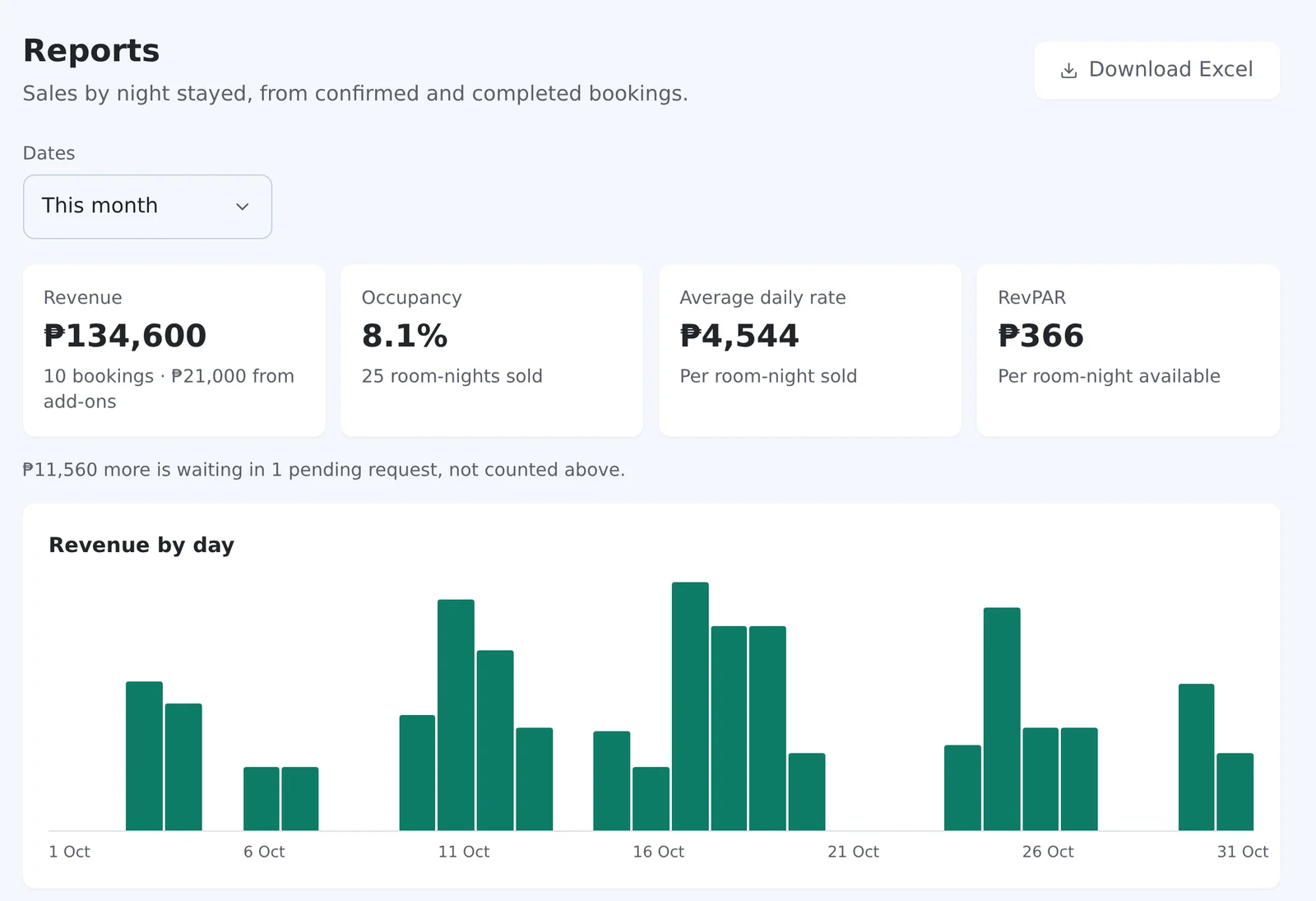
Revenue, occupancy, average rate and RevPAR, by room and by source, with add-ons counted apart from rooms. Download it all to Excel.

The Reports screen for October: revenue, occupancy, average daily rate and RevPAR, then a bar chart of revenue by day.

Your desk, the right hands.

Your manager and staff get their own logins. Everyone sees the bookings. Only you change the settings. Run two places? One login reaches both.

OwnerEverything, including settings, payment instructions and reports.
ManagerBookings, rooms, blockouts, menu, services and messages. Sees reports.
StaffSees every booking and message. Changes nothing.

See your own website first.

It isn’t a template with your name dropped in. It’s built for your place, the same way your real site would be, before you sign up.

Talk to us
  1. Tell us about your place

    Your rooms, your rates, what you serve and what guests ask for.

  2. We build your demo

    A working website for your place, on its own address, with your rooms and rates in TravelFrontDesk behind it.

  3. Try it like a guest

    Open it on your phone, pick dates, send a request, and watch it arrive in the admin.

One admin behind every way a guest reaches you.

Bookings come in from

  • Your website
  • Walk-ins
  • Phone and Messenger
TravelFrontDesk your admin

And go out as

  • Email to the guest
  • Reports and Excel

Agoda, Booking.com and Airbnb sync works, a few times a day.

Why we built TravelFrontDesk

We’re Brand N Build, a small studio in the Philippines. For years we built websites for resorts and inns, and we kept seeing the same thing.

The site looked lovely, but it couldn’t take a booking. The rooms were on Agoda, the birthdays were in Messenger, and the breakfast menu was a photo from two years ago.

So we built the system behind the website. We still build each site by hand, for that one place. TravelFrontDesk is what runs it.

Brand N Build Services

What works today, and what doesn’t yet

Works today

  • Your own website, built for your place
  • Booking requests that hold the room for 72 hours
  • Add-ons guests pick while booking, like breakfast or a transfer
  • Walk-in and phone bookings entered at the desk
  • Blockouts for a whole room type, some of its units, or the whole place
  • Menu, services, occasions and facilities on your site
  • Inquiries you answer from the admin
  • Sales reports, and bookings exported to Excel
  • Calendar sync with Agoda, Booking.com and Airbnb, a few times a day (Agoda: room types with 1 room)
  • Owner, manager and staff logins, several properties under one

Not yet

  • Online card or GCash payment
  • Bookings in your Google Calendar

Until then, close dates sold elsewhere with a blockout, and tell guests how to pay in your own words.

Asked before signing up.

Something else on your mind? We reply by email.

Talk to us
Do I need to know anything technical?
No. We build the website and set up the admin with your rooms, menu and photos. You and your staff use the admin like any app.
I already have a website.
We build you a new one for your place and look after it once it’s live. TravelFrontDesk runs on the websites we build.
Do you take a cut of my bookings?
No. Guests pay you directly, the way you tell them to.
Does it sync with Agoda?
Yes. Each room swaps calendar links with Agoda, Booking.com or Airbnb, so a stay booked there closes the night here, and a full night here closes it there, a few times a day. Agoda syncs only room types with exactly 1 room.
Can I see it before I pay?
Yes. We build a demo website for your place first, so you can try it like a guest.

See it with your own rooms.

Tell us about your place. We’ll build you a demo website to try, and walk you through what setup involves.